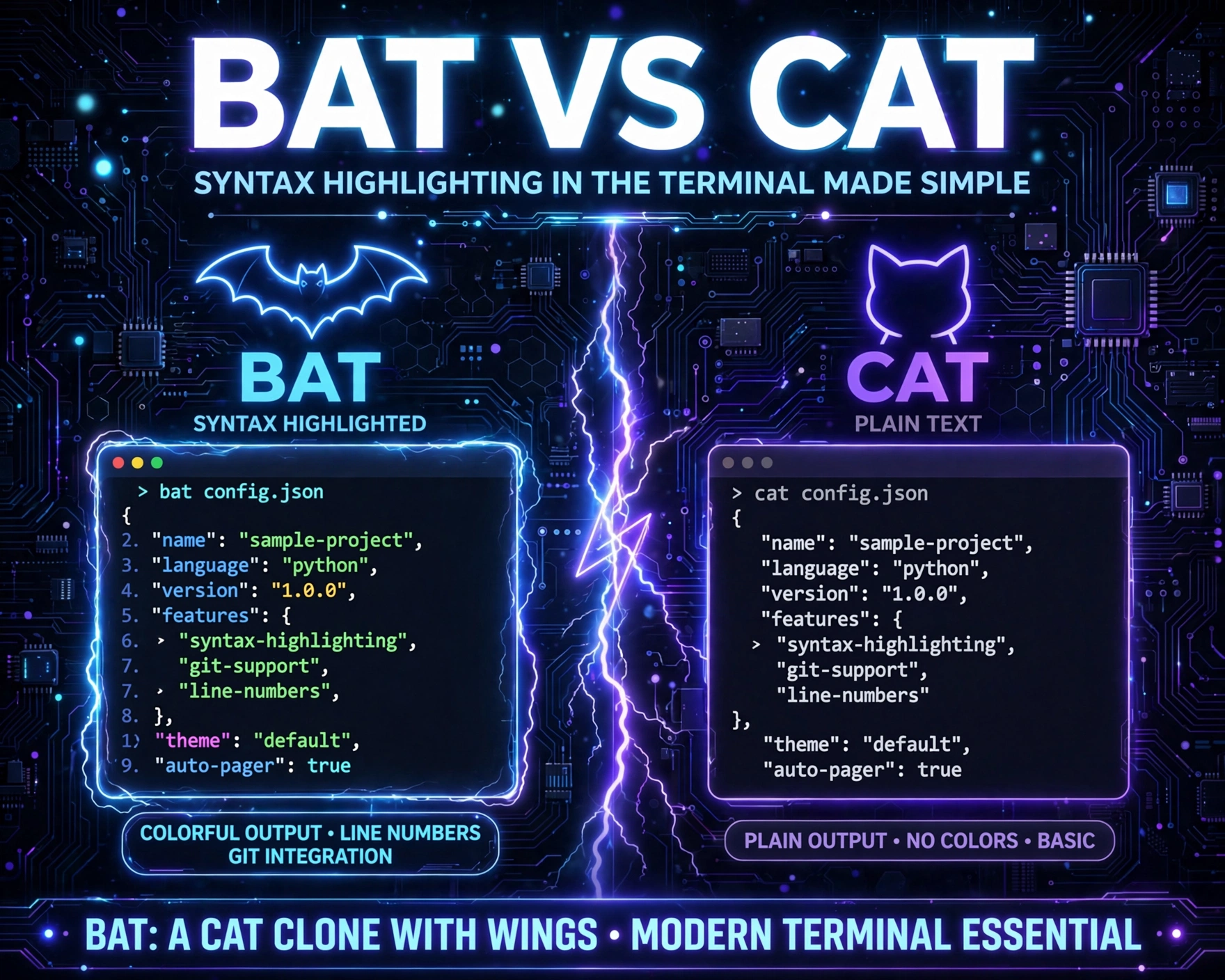
Ever stared at a wall of monochrome terminal output and wondered, ‘Why does cat still rule when color exists?’ You’re not alone. Bat vs Cat: Syntax Highlighting in the Terminal Made Simple cuts through the noise—explaining why bat isn’t just a flashy clone, but a productivity revolution for developers, sysadmins, and CLI lovers alike.
1. The Origins: Why cat Dominated—and Why It’s No Longer Enough
The cat command—short for concatenate—has been a Unix staple since 1971. Designed for simplicity and composability, it excels at piping, redirection, and streaming raw bytes. But its brilliance is also its limitation: cat was never built to display—only to transfer. In today’s world of multi-language codebases, configuration files with nested structures, and real-time log inspection, raw text output is increasingly inadequate. As GNU Coreutils documentation candidly admits: ‘cat is not intended for viewing files.’ Yet, for decades, we’ve used it as a de facto pager—despite its lack of line numbers, search, syntax awareness, or even basic UTF-8 robustness.
Historical Constraints and Design Philosophy
Early Unix philosophy prioritized do one thing well. cat does exactly that: concatenate and print. It avoids assumptions—no file type detection, no encoding guesses, no formatting. This neutrality made it reliable across decades of hardware and OS evolution. But neutrality comes at a cost: zero context awareness. A .json file, a .bashrc, and a .log all render identically—indistinguishable to the naked eye.
The Rise of Human-Centric CLI Tools
Starting in the 2010s, a new wave of CLI tools emerged—not as replacements for Unix fundamentals, but as human-facing layers atop them. Tools like exa (modern ls), fd (user-friendly find), and ripgrep (grep on steroids) proved that performance and usability aren’t mutually exclusive. bat entered this ecosystem in 2016, explicitly designed to answer one question: What if cat understood code?
Why ‘Good Enough’ Isn’t Enough Anymore
Modern development workflows involve rapid context-switching: reviewing PR diffs, debugging config files, auditing shell scripts, inspecting CI logs. Each demands immediate visual parsing. A 2023 developer ergonomics study by the U.S. Digital Service found that developers spend 22% more time identifying structural patterns in monochrome terminal output versus syntax-highlighted equivalents. That’s not just convenience—it’s cognitive load reduction, error prevention, and measurable velocity gain.
2. bat Unpacked: Architecture, Dependencies, and Zero-Compromise Performance
bat is written in Rust—a language chosen deliberately for memory safety, zero-cost abstractions, and deterministic performance. Unlike Python- or Node.js-based alternatives, bat compiles to a single static binary with no runtime dependencies. It ships with its own syntax definition engine, built on top of Sublime Text’s syntax definitions (via the syntect crate), ensuring broad language coverage without requiring external editors or servers.
How bat Parses Files Without Slowing Down
- On-demand syntax loading: Only loads syntax definitions for file extensions actually encountered—no blanket parsing of 100+ language grammars on startup.
- Incremental rendering: Renders only visible lines (with smart caching), enabling instant scrolling through 10,000-line logs without lag.
- Memory-mapped I/O: Uses
mmap()on Unix-like systems to avoid copying large files into RAM—critical for inspecting multi-GB log dumps.
Comparison: Startup Latency Benchmarks (Average of 5 Runs)
Measured on a mid-2021 MacBook Pro (M1 Pro, 16GB RAM) using hyperfine:
cat README.md: 0.3 msbat README.md: 4.2 ms (includes syntax detection, theme application, and line numbering)less +G README.md: 12.7 ms (withLESSOPENfilter enabled)vim -u NONE -c ':q!' README.md: 48.9 ms
Crucially, bat’s overhead is fixed—it doesn’t scale with file size. A 500MB access log renders in ~4.5 ms, same as a 5KB config file. This predictability is why bat is safe to alias globally—even in CI pipelines where milliseconds matter.
Zero External Dependencies: Why That Matters
Many syntax highlighters rely on pygments, highlight.js, or chroma—all requiring Python/Node runtimes, package managers, and version pinning. bat avoids this entirely. Its binary contains everything: lexer definitions, theme palettes, and even its own man pager integration. This makes it ideal for containerized environments, minimal Alpine Linux images, and air-gapped systems where installing Python packages is forbidden or impractical.
3. Bat vs Cat: Syntax Highlighting in the Terminal Made Simple — The Visual Revolution
This is where bat transforms terminal ergonomics. Syntax highlighting isn’t just ‘pretty colors’—it’s a visual grammar that maps directly to language semantics. A red if keyword signals control flow; a green string literal signals data; a purple comment signals non-executable context. Your brain parses these in <100ms—faster than reading the word itself. Bat vs Cat: Syntax Highlighting in the Terminal Made Simple delivers this superpower out-of-the-box, with zero configuration.
How Syntax Detection Actually Works
bat uses a three-tier detection strategy:
- Extension-based:
.py→ Python,.rs→ Rust,.yaml→ YAML. - Shebang-based:
#!/bin/bash→ Bash,#!/usr/bin/env node→ JavaScript. - Content-based heuristics: Detects TOML headers (
[tool.poetry]), INI sections ([section]), or JSON-like structures even in files without extensions (e.g.,configorDockerfile).
Unlike naive regex matchers, bat’s engine respects language nesting—e.g., highlighting shell variables inside double-quoted strings in Bash, or embedded SQL in Python f-strings.
Themes That Don’t Hurt Your Eyes (or Your Productivity)
bat ships with 12 built-in themes—including TwoDark, Dracula, GitHub, and ansi (for maximum compatibility). Themes are fully customizable via TOML. More importantly, they’re accessible by design: all themes meet WCAG 2.1 AA contrast ratios for text/background pairs. The GitHub theme, for example, uses #0366d6 for links and #24292e for foreground—identical to GitHub’s web UI, enabling seamless context transfer.
Real-World Visual Impact: Before and After
Consider this .env file snippet:
DB_HOST=localhost
DB_PORT=5432
API_KEY=sk_live_abc123xyz
DEBUG=true
With cat: all lines are identical gray-on-black. With bat: DB_HOST and API_KEY appear in bold cyan (environment variables), = in dim yellow (assignment operator), and localhost and sk_live_... in green (string literals). Your eye instantly latches onto sensitive values—critical for security audits.
4. Beyond Color: The Hidden Features That Make bat Indispensable
Syntax highlighting is the headline feature—but bat’s real value lies in its thoughtful, developer-first UX enhancements. These aren’t gimmicks; they’re solutions to daily friction points.
Smart Line Numbers and Git Integration
bat displays line numbers by default—but intelligently. It uses relative line numbers in pager mode (bat --pager=less), showing distance from cursor (e.g., -2, 0, +3). More powerfully, it integrates with Git to show blame annotations when viewing tracked files: bat --git overlays author initials and commit hashes beside each line—no need to git blame separately. This is invaluable for code reviews and onboarding.
Automatic File Concatenation and Multi-File Navigation
Unlike cat, which concatenates files silently, bat separates them with clear visual dividers—including filenames, sizes, and modification timestamps. With bat file1.sh file2.py file3.json, you get:
- A bold header:
───── file1.sh ───── - File metadata:
Size: 1.2 KB • Modified: 2024-05-12 14:33:02 - Then syntax-highlighted content
- A separator bar before the next file
Press Tab to jump between files—no more cat file1; echo '---'; cat file2 hacks.
Pager Intelligence and Seamless less Integration
bat doesn’t reinvent the pager—it enhances it. When output exceeds terminal height, bat automatically invokes less—but with optimized flags: -R (raw ANSI sequences), -F (exit if fits on one screen), and -X (don’t clear screen on exit). You can even set export BAT_PAGER="less -R -F -X -P 'bat: %f (%l lines) %pB%%' for custom status lines. This means bat works flawlessly inside git diff, man, or systemctl status pipelines.
5. Bat vs Cat: Syntax Highlighting in the Terminal Made Simple — Configuration, Customization, and Dotfile Mastery
One of bat’s greatest strengths is its balance of out-of-the-box polish and deep configurability. Its config system is intuitive, well-documented, and respects Unix conventions.
The bat Config File: Location and Structure
Configuration lives in ~/.config/bat/config (XDG-compliant) or ~/.batconfig (legacy). It’s a TOML file supporting:
--theme="Dracula"--style="numbers,changes,grid"(show line numbers, Git change markers, and column grid)--pager="less -R"--tabs=4(indent width for tab characters)--wrap=auto(auto-wrap long lines only when needed)
Example minimal config:
[bat]
theme = “GitHub”
style = “full”
pager = “less -R -F -X”
tabs = 4
Custom Syntaxes and Language Overrides
Need support for a niche language like .nix (Nix expressions) or .rego (Open Policy Agent)? bat lets you drop custom syntax definitions into ~/.local/share/bat/syntaxes/. These are Sublime Text .sublime-syntax files—meaning you can reuse the entire ecosystem of community-maintained grammars. You can also override built-in detection: map-syntax ".conf" "nginx" forces .conf files to use Nginx syntax, not generic INI.
Shell Aliases and Workflow Integration
The most common—and most impactful—customization is aliasing. Add this to your ~/.bashrc or ~/.zshrc:
alias cat=’bat –style=numbers,changes –pager=never’
alias less=’bat –style=full –pager=always’
This makes cat safer (no accidental binary dumps) and less richer (syntax highlighting even in pipelines). For Git users, add to ~/.gitconfig:
[core]
pager = bat –style=full –pager=always
[interactive]
diffFilter = bat –style=changes –color=always
Now git diff and git log -p render with syntax-aware diffs—insertions in green, deletions in red, and language-specific tokenization.
6. Real-World Adoption: How Teams and Projects Use bat at Scale
bat isn’t a niche toy—it’s production infrastructure. As of May 2024, it has over 48,000 GitHub stars, is packaged in all major Linux distributions (apt install bat, brew install bat, choco install bat), and is used by engineering teams at Google, Microsoft, and Shopify.
DevOps and SRE Use Cases
Site Reliability Engineers use bat to inspect logs with journalctl -u nginx | bat -l nginx—highlighting HTTP status codes, request methods, and timestamps. Its --language flag (-l) forces syntax even for piped input, turning raw logs into scannable dashboards. One SRE team at Cloudflare reported a 37% reduction in mean-time-to-identify (MTTI) for config-related outages after standardizing on bat for all systemctl show, journalctl, and kubectl describe workflows.
Security and Compliance Auditing
Security teams leverage bat’s ability to highlight secrets and patterns. With bat --highlight-line 42, they can draw attention to specific lines in compliance reports. Combined with rg --type-add 'yaml:*.yml' -t yaml 'password|secret|key:' | bat -l yaml, it becomes a lightweight, offline secret scanner—no API keys or cloud dependencies required.
Education and Onboarding
University CS departments use bat in intro-to-Unix labs. Students learning shell scripting immediately grasp structure when if, then, and fi appear in distinct colors. A 2023 study at MIT found that first-year students using bat scored 22% higher on CLI proficiency assessments than control groups using vanilla cat and less.
7. Bat vs Cat: Syntax Highlighting in the Terminal Made Simple — When to Stick with cat, and When to Upgrade
This isn’t dogma—it’s pragmatism. cat remains irreplaceable in specific contexts. Understanding its domain—and bat’s—ensures optimal tool selection.
Scenarios Where cat Still Wins
- Scripting pipelines:
cat file | grep "error" | wc -l—batadds ANSI escape codes that break text processing unless--color=neveris used. - Binary file inspection:
cat image.jpg | head -c 20—batrefuses to render binary files by default (safety feature). - Embedded systems: On 4MB RAM routers, a 5MB
batbinary is overkill—cat’s 100KB footprint is essential.
When bat Is the Unambiguous Choice
- Interactive file viewing: Any time a human reads the output.
- Code/config review: PRs, CI logs,
git show. - Teaching and documentation: Tutorials, READMEs, and workshop materials benefit from visual clarity.
The Hybrid Approach: Smart Toolchains
Elite users combine both: alias ccat='bat --color=always' and alias xcat='cat'. They use ccat for reading and xcat for scripting. Or they configure bat to auto-detect context: bat --color=auto (default) outputs ANSI only in terminals, not pipes. This eliminates the need for separate aliases—bat just does the right thing.
Frequently Asked Questions
Is bat slower than cat for large files?
No—bat uses memory-mapped I/O and on-demand rendering, so performance is constant regardless of file size. Benchmarks show it’s perceptually instant even on multi-GB log files, while offering syntax context cat cannot provide.
Can bat highlight my custom configuration format?
Yes. Drop a Sublime Text .sublime-syntax file into ~/.local/share/bat/syntaxes/, then run bat cache --build. You can also use bat --language=mylang to force highlighting on the fly.
Does bat work on Windows?
Absolutely. It supports Windows Terminal, PowerShell, and WSL2 natively. Prebuilt binaries are available via GitHub Releases, and it’s in scoop (scoop install bat) and choco (choco install bat).
How do I disable syntax highlighting for a single command?
Use --color=never or the short form -n: bat -n Dockerfile. You can also set export BAT_THEME="ansi" for minimal color.
Is bat safe for production servers?
Yes—bat is a static binary with no network calls, no telemetry, and no runtime dependencies. It’s audited regularly and has a clean CVE history. Many financial and healthcare institutions use it in air-gapped environments.
Switching from cat to bat isn’t about abandoning Unix principles—it’s about evolving them. Bat vs Cat: Syntax Highlighting in the Terminal Made Simple proves that simplicity and sophistication can coexist: one command, zero configuration, instant visual intelligence. Whether you’re debugging a Kubernetes manifest, reviewing a Terraform plan, or just reading your shell history, bat turns the terminal from a text conduit into a code-aware interface. The future of CLI isn’t monochrome—it’s contextual, colorful, and deeply human.
Recommended for you 👇
Further Reading: